Complete Guide to the T-Marker All-on-T (AOT): Precision in Full-Arch Rehabilitations
Smart Dent (Mmtech) has been a reference in CAD/CAM workflows and digital dental 3D printing in Brazil since 2009. Technical Article.
Smart Dent (Mmtech) has been a reference in CAD/CAM workflows and digital dental 3D printing in Brazil since 2009. Technical Article.
Complete Guide to the T-Marker All-on-T (AOT): Precision in Full-Arch Rehabilitations
📊 Quick Technical Summary
The T-Marker All-on-T (AOT) from TruAbutment is an extraoral solution for detecting multi-unit abutments (MUA) in full-arch rehabilitations, using Apple devices (iPad Pro or iPhone 15 Pro/Pro Max). It provides clinically precise data on the location of MUA abutments in .stl format, overcoming the limitations of intraoral scanners over large spans and ensuring an ideal passive fit for prostheses. The system is compatible with TruAbutment's All-on-T line of prosthetic components, which in turn serves as an intermediary for various implant brands such as Neodent, Nobel Biocare, BioHorizons, Dentsply Sirona, and Osstem.
- Technology: Extraoral photogrammetry via Apple iPad/iPhone Pro
- Data Output: .stl file with vector position of implants
- Compatibility: Multi-Unit Abutment (MUA) abutments from the All-on-T line (TruAbutment) and Straumann®
- Application: Full-arch rehabilitations (All-on-X)
Digital dentistry has transformed the way professionals plan and execute complex rehabilitations. In the context of full-arch rehabilitations, precision in capturing implant positions is a critical factor for long-term success. The T-Marker All-on-T (AOT) from TruAbutment, distributed by Smart Dent, emerges as an innovative solution that optimizes this process, ensuring an ideal passive fit and minimizing the risks of structural failure or screw loosening. Learn more about T-Marker Device compatible with Straumann. Learn more about T-Marker All-on-T (AOT) Device.
This system represents a significant advance by overcoming the limitations of traditional intraoral scanners over large spans, which often suffer from cumulative "stitching" errors and difficulties caused by mucosal movement. With the T-Marker, the exact position of multi-unit abutments (MUAs) is captured efficiently and reliably, using extraoral photogrammetry technology.
🔬 The Science Behind It: T-Marker Technology and Compatibility
Apple® Technology
Uses iPad Pro or iPhone 15 Pro/Pro Max for data capture.
Sub-100 Micron Precision
Ensures ideal passive fit for full-arch prostheses.
Unlimited STL Export
Seamless integration with CAD software like exocad.
The T-Marker is a multi-unit abutment (MUA) detection solution developed for use with Apple® tablets. It provides clinically precise data on the location of MUA abutments in .stl file format. This solution allows clinical and dental laboratory professionals to capture MUA abutment location data with consistency, accuracy, and efficiency throughout the restorative process.
How the T-Marker System Works:
- Use of Cell Phone or Tablet: The system transforms your iPad Pro or iPhone Pro (model 15 or newer) into a scanner. Through the T-Marker app, your device's camera reads the exact position of the markers in the patient's mouth.
- App Features: The app calculates angulations in seconds, allows quick real-time angle verification, and exports STL files unlimitedly to your lab.
The T-Marker optimizes implant capture in full-arch rehabilitations using the Apple ecosystem, eliminating the need for complex, wired photogrammetry equipment. The main function of this system is to overcome the limitations of intraoral scanners in large-span captures, where cumulative "stitching" errors and difficulties caused by mucosal movement can compromise accuracy. The passive fit of a full-arch prosthesis does not tolerate deviations greater than 100 microns without risk of screw loosening or structural failure, and photogrammetry acts as a "template" to ensure this precision.
T-Marker All-on-T (AOT) Compatibility
The T-Marker All-on-T (AOT) is manufactured to fit TruAbutment's proprietary prosthetic component line, called All-on-T. The All-on-T functions as a versatile abutment that serves as an intermediary for implants from various other brands, such as Neodent, Nobel Biocare, BioHorizons, Dentsply Sirona, and Osstem.
| Implant Brand | Implant Brand | Implant Brand |
|---|---|---|
| AlphaBio | MegaGen | Medentis Medical |
| Adin | Meisinger | Nobel Biocare |
| ACH Medical | Neodent | NeoBiotech |
| BioHorizons | SWEDEN & MARTINA | Southern Implants |
| Biomet 3i | S.I.N. Implant | THOMMEN Medical |
| Camlog | ZimVie | |
| Dentsply Sirona | ||
| DENTIS | ||
| DESS | ||
| ETK Tetra | ||
| Hiossen | ||
| J Dental Care |
| Implant Brand | Implant Brand |
|---|---|
| MIS | Ritter |
T-Marker™ Product Specifications
| Component | Diameter (Ø) | Height |
|---|---|---|
| AT-01 T-Marker | 7.7mm | 14.1mm (total), 11.1mm, 4.0mm |
| HS Cap Small | 4.8mm | 5.5mm |
| HS Cap (Sold separately) | 6.9mm | 5.5mm |
🏆 Authority and Scientific Compliance
Development and Innovation
The T-Marker™ is a solution from TruAbutment, a company dedicated to innovations in digital dentistry. Smart Dent, the official distributor, works with international manufacturers and its own technical teams, being a national reference in complete digital dentistry workflows. Smart Dent's expertise in 3D resins, printing, CAD/CAM, and scanning ensures the selection of cutting-edge solutions for the Brazilian market.
Proven Accuracy
The T-Marker™ system was developed to ensure reliable and efficient identification of MUA abutments, overcoming image stitching errors or limited access around scan bodies that can occur with intraoral scanners. The extraoral data detection solution requires no calibration, ensuring consistent and precise results for the restorative process.
📋 T-Marker™ Capture Protocol: Step-by-Step for Success
This protocol details the workflow for using the T-Marker™ system, from preparation to data export, ensuring maximum precision in detecting multi-unit abutments (MUA) in full-arch rehabilitations.
Required Materials and Equipment:
- T-Marker™ Kit (All-on-T, Juris, or Straumann®)
- 1.25 HS Hexagonal or Torx screwdriver (depending on the kit)
- iPad Pro® (2024 or newer) or iPhone 15 Pro or Pro Max (or newer models)
- T-Marker™ App (available on the App Store®)
- Multi-unit abutment (MUA)
Step-by-Step Procedure:
-
Step 1: Marker Preparation
Attach the physical T-Marker™ markers to the multi-unit abutments (MUAs) in the patient's mouth. Ensure all markers face forward for accurate detection. A minimum of three markers is required for the tablet to recognize them.
-
Step 2: App Download and Activation
Download the T-Marker™ app from the App Store®. New users should click "Need to activate" and choose the desired subscription option.
-
Step 3: Device Pairing
Pair the Apple® tablet with the TruSuite T-Marker™ app. Enter the 9-digit tablet number into the app to complete pairing.
-
Step 4: Case Setup
Select the case type (upper or lower) and enter the case name or number in the app. Then, select the number of markers to be captured (the T-Marker™ can detect up to 10 markers simultaneously).
-
Step 5: Arch Alignment
Align the contour displayed on the Apple® device screen with the patient's arch.
-
Step 6: Capturing T-Markers™
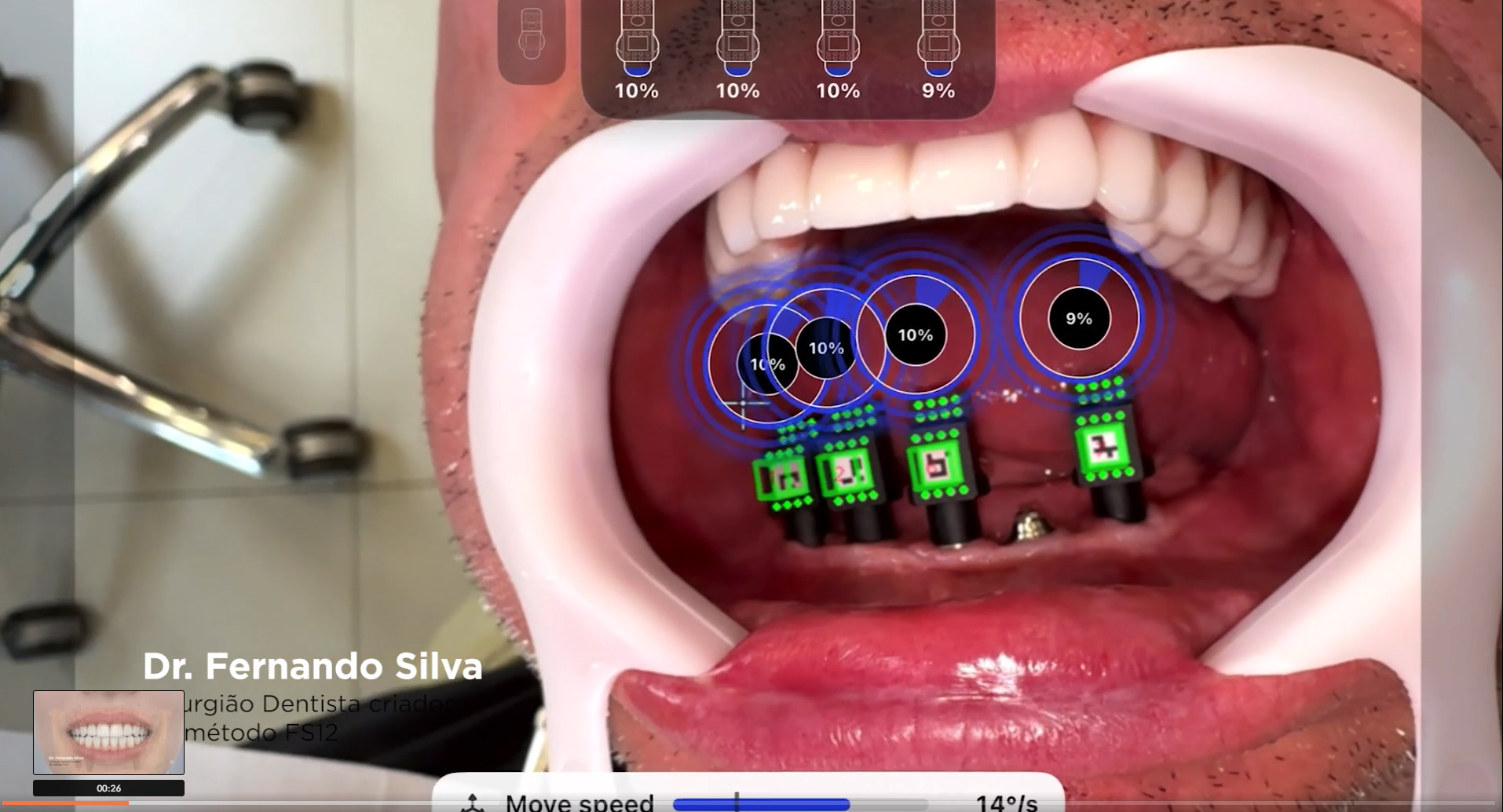
Start the camera to detect the T-Markers™. Keep the camera at an ideal distance of 3 to 5 inches (7 to 12 cm) from the marker, positioned at 45° to it. Move the camera approximately 10° to the left, return to the center, and then rotate approximately 10° to the right to capture the position data for each marker. A blue circular indicator shows detection progress.
-
Step 7: Capture Verification
Each T-Marker™ will display "COMPLETED" when capture reaches 100%, confirming that the marker's position data has been accurately captured. The green cube indicates correct focus and ideal angle.
-
Step 8: Obstruction Management
If a T-Marker™ blocks the detection of other marker(s), fully capture the blocking marker, then remove it. Proceed with capturing the remaining marker(s), taking care not to move or unscrew the other markers.
-
Step 9: Data Export
Verify the export type for the generated MUA locations (e.g., HS Cap Small, MUA Cone, Dual Align Scan Body). To save and send the generated MUA locations as an .stl file via email or AirDrop®, click "Export". To save the case directly in the TruSuite T-Marker™ app, click "Accept Results".
⚠️ Points of Attention:
- T-Markers™ must not be covered by any object, as this will affect the accuracy of the results.
- To activate autofocus, start by holding the camera 8 inches away and slowly move it closer (5 to 3 inches) until the markers are recognized and the small cross on the screen is centered.
- For mandibular cases, capture the T-Marker™ facing the patient's face. For maxillary cases, position the patient supine and capture the T-Marker™ from above the patient's head.
T-Marker All-on-T (AOT) Device
The T-Marker All-on-T (AOT) is the definitive solution for professionals seeking excellence and predictability in full-arch rehabilitations. Ideal for clinics performing All-on-X procedures, this system transforms implant capture, overcoming the limitations of intraoral scanners and eliminating distortion errors. Its application is intuitive, using Apple devices such as iPad Pro or iPhone Pro, and offers a digital workflow that optimizes chair time and ensures confidence in the final result.
Developed for Multi-Unit Abutments, the T-Marker acts as a rigid template, ensuring a perfect passive fit of prostheses. It allows real-time verification of angulations and unlimited export of STL files, easily integrating with design software like exocad. Choose this innovation to elevate the quality of your treatments and offer the best in digital dentistry.
Invest in the Precision of the T-Marker All-on-T (AOT)
Ensure excellence in your full-arch rehabilitations. Contact us to acquire the T-Marker All-on-T (AOT) and transform your digital workflow.
T-Marker Device compatible with Straumann
The T-Marker compatible with Straumann is the definitive solution for professionals seeking excellence and predictability in full-arch rehabilitations. Ideal for clinics performing All-on-X procedures, this system transforms implant capture, overcoming the limitations of intraoral scanners and eliminating distortion errors. Its application is intuitive, using Apple devices such as iPad Pro or iPhone Pro, and offers a digital workflow that optimizes chair time and ensures confidence in the final result.
Developed specifically for Straumann® Multi-Unit Abutments, the T-Marker acts as a rigid template, ensuring a perfect passive fit of prostheses. It allows real-time verification of angulations and unlimited export of STL files, easily integrating with design software. Choose this innovation to elevate the quality of your treatments and offer the best in digital dentistry.
Acquire the T-Marker compatible with Straumann
The cost of the system is divided between the purchase of physical parts and the use of software. The T-Marker Device compatible with Straumann is available for R$ 17,900.00 or in 10 installments of R$ 1,790.00 on Card. The app subscription is US$ 99 per month, with semi-annual (US$ 499) and annual (US$ 899) options. The tablet or smartphone is not included.
Apple® Hardware Requirements for the T-Marker™
To operate the T-Marker™ app, TruAbutment requires specific high-performance Apple devices:
- iPhone: It is necessary to use an iPhone 15 Pro or newer models, and they must be from the Pro or Pro Max lines.
- iPad: The system requires the iPad Pro line. The manufacturer's hardware recommendation for best performance is the use of models with the M4 chip or higher.
- Operating System: The app is exclusively for the Apple ecosystem and does not work on Android devices.
✅ Conclusion and Expert Opinion
Precision is the foundation of any successful prosthetic rehabilitation, especially in full-arch cases. The T-Marker™ system represents a qualitative leap in digital dentistry, offering professionals a robust and intuitive tool to overcome the inherent challenges of capturing multiple implants. By integrating Apple technology with an optimized workflow, TruAbutment, in partnership with Smart Dent, ensures that the final result is an impeccable passive fit, essential for patient longevity and comfort.
💡 Protect Your Clinical Reputation
Use certified materials and follow protocols validated by specialists. Invest in quality digital dentistry with solutions like the T-Marker™. Smart Dent is ready to be your partner in this journey of innovation.
Vídeos relacionados

Perguntas Frequentes
What are the main advantages of using the T-Marker All-on-T (AOT) in full-arch rehabilitations?
The T-Marker All-on-T (AOT) offers sub-100 micron precision in detecting multi-unit abutments, overcoming intraoral scanner limitations like stitching errors and mucosal movement issues, ensuring an ideal passive fit for prostheses. This extraoral photogrammetry system, distributed by Smart Dent, optimizes the digital workflow, minimizes structural failure risks, and allows unlimited STL export for seamless integration with CAD software like exocad.
Does it pay off for a dental clinic or laboratory to invest in the T-Marker All-on-T (AOT) digital workflow?
Investing in the T-Marker All-on-T (AOT) digital workflow is beneficial as it enhances precision in full-arch rehabilitations, reducing rework and improving clinical predictability. By overcoming intraoral scanner limitations and providing sub-100 micron accuracy, it ensures an ideal passive fit for prostheses, optimizing chair time and streamlining the process from capture to CAD software integration, ultimately elevating treatment quality.
How does the T-Marker All-on-T (AOT) system integrate with different implant brands?
The T-Marker All-on-T (AOT) is designed to fit TruAbutment's proprietary All-on-T prosthetic component line, which acts as a versatile intermediary for various implant brands. This allows compatibility with implants from companies such as Neodent, Nobel Biocare, BioHorizons, Dentsply Sirona, and Osstem, ensuring broad applicability across different implant systems for full-arch rehabilitations.
What are the first steps to start using the T-Marker All-on-T (AOT) in a dental practice?
To begin using the T-Marker All-on-T (AOT), professionals first need the T-Marker kit, an iPad Pro (2024 or newer) or iPhone 15 Pro/Pro Max, and the T-Marker app from the App Store. The initial steps involve attaching physical markers to MUAs in the patient's mouth, downloading and activating the app, pairing the Apple device, and setting up the case within the app before proceeding with marker capture.
Is specific training required to operate the T-Marker All-on-T (AOT) system effectively?
While the T-Marker All-on-T (AOT) system is designed for intuitive application using Apple devices, understanding its capture protocol is essential for maximum precision. The article details a step-by-step procedure, including marker preparation, device pairing, case setup, and specific camera movements for accurate capture, suggesting that familiarity with this protocol ensures effective and reliable results in detecting multi-unit abutments.
What kind of support does Smart Dent offer for the T-Marker All-on-T (AOT) system?
Smart Dent, as the official distributor of TruAbutment's T-Marker All-on-T (AOT) in Brazil, leverages its expertise in digital dentistry workflows, 3D resins, printing, and CAD/CAM. This background ensures the selection of cutting-edge solutions for the Brazilian market and implies comprehensive support, given Smart Dent's role as a national reference working with international manufacturers and its own technical teams.